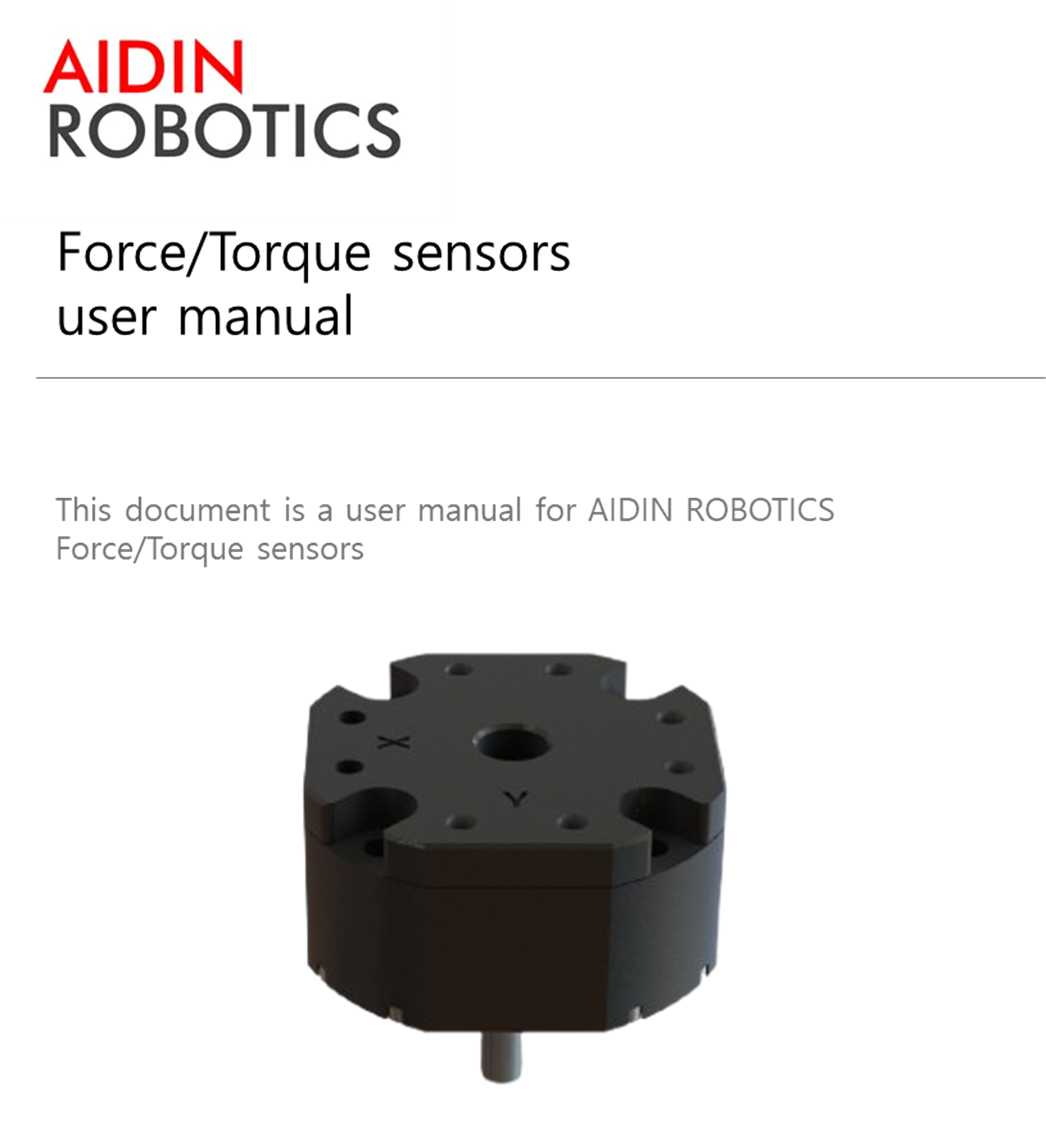
Smart 6-axis Force Torque Sensor, AFT150-D50-C
Rev. 2026.09.15
Foreword
Thank you for purchasing our Force Torque sensor. This manual contains the information necessary for the correct use of the AIDIN ROBOTICS AFT150-D50 sensor. Please carefully read this manual when using this software. Please note that the basic performance of the product will not be exhibited when the robot system is used out of conditions. This manual describes possible dangers and consequences using Force Torque sensor. Be sure to comply with safety precautions written in this manual to use safety and correctly.
Notice
This manual Do NOT allow copy, reproduction or share without authorization of AIDIN ROBOTICS. Please notify us any errors in this manual or the provided instructions.
Manufacturer
AIDIN ROBOTICS,
Safety Precautions
Installation of Force Torque sensor MUST be performed by qualified personnel in accordance with national and local codes. Please carefully read this manual when using this software.
Warning & Caution
🚫 This symbol indicates that a danger of possible serious injury or death exists if the associated instructions are not followed properly.
⚠️ This symbol indicates that a danger of possible harm to people or physical damage to equipment and facilities exists if the associated instructions are not followed properly.
1. Product Overview
1.1 Smart 6-axis Force Torque Sensor, AFT150-D50
1.2 Flyer
1.3 Key Features
- Smart 6-axis force/torque sensor
- All-in-one sensor (No additional amplifier)
- Digital output communications (CAN, CAN-FD)
- Easy installation and data collection
- Grippers, robot hands, collaborative robot, industrial robot
1.4 Specifications
| Index | Unit | Value |
|---|---|---|
| Operating voltage | VDC | 5 |
| Max. safe excitation voltage | VDC | 12 |
| Nominal force range (F_XYZN) | N | 150 |
| Nominal torque range (M_XYZN) | Nm | 7.5 |
| Limit force (F_XYZL) | N | 300 |
| Limit torque (M_XYZL) | Nm | 10 |
| Dimensions | mm | D50 x H17.7 |
| Weight | g | 60 |
| Temperature | ℃ | 10-50 |
| Sample rate | Hz | 1000 |
| Interfaces | 1,000Kbps | CAN, CAD-FD |
| Wire | Length: 15 cm | For User: CAN_H / CAN_L / VCC / GND |
1.5 Complex Loading Range
The sensor can operate up to its nominal capacity, while a single axis load. On Nominal capacity reading is incorrect and invalid. The nominal capacity of composite loading is The following diagram illustrates a complex loading scenario. The sensor cannot operate outside the normal operating area The following graph shows the range of payloads and tool lengths that can be used with AFT150-D50-C sensor for applications requiring high or moderate precision. A • The total percentage of the calibrated range used by Fxy and Tz axes is greater than 105%. Refer to the following Fxy, Tz equation.
• The total percentage of the calibrated range used by Fz and Txy axes is greater than 105%. Refer to the following Fz, Txy equation.
2. Installation Guide
2.1 Basic Components
- AFT150-D50 x 1 EA
2.2 Mounting
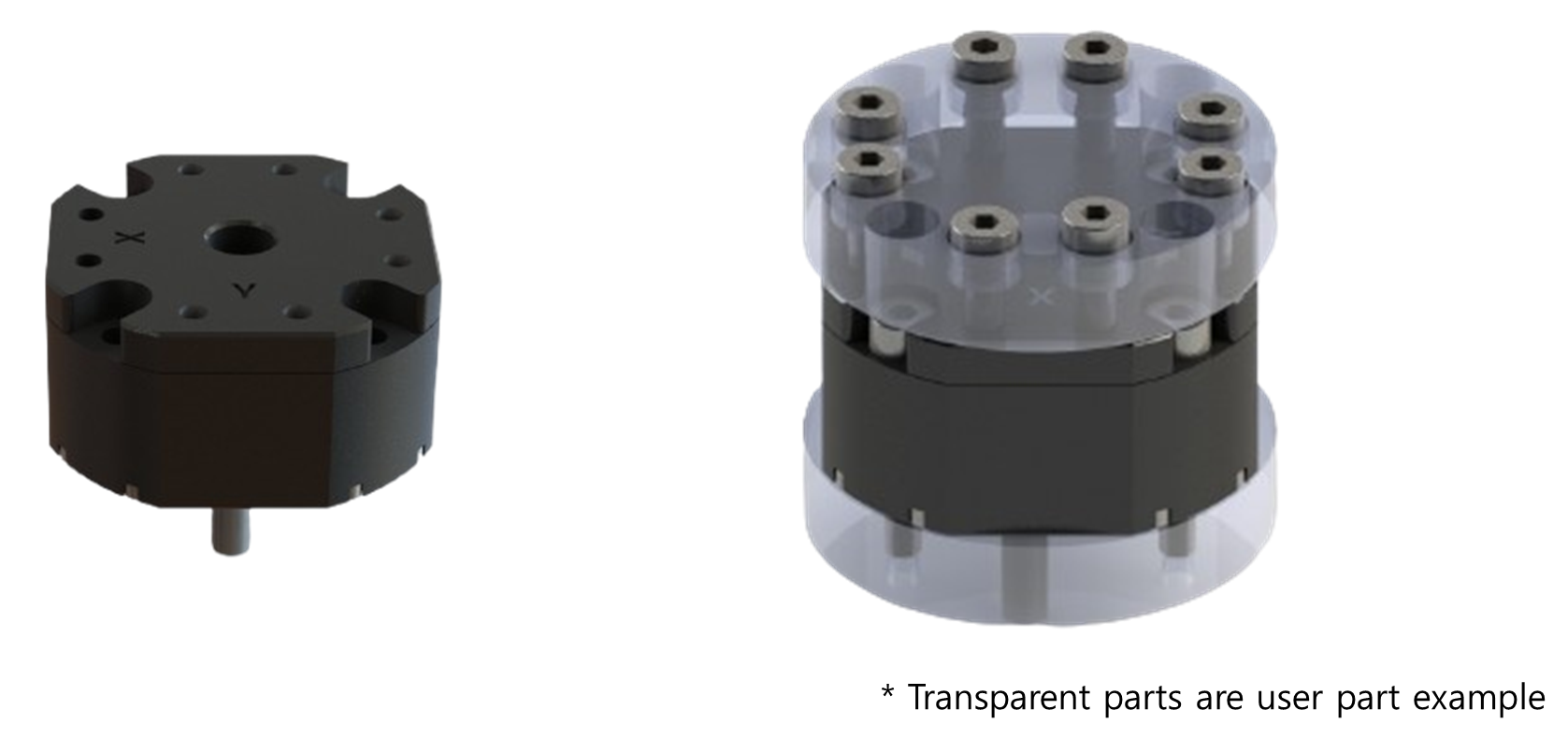
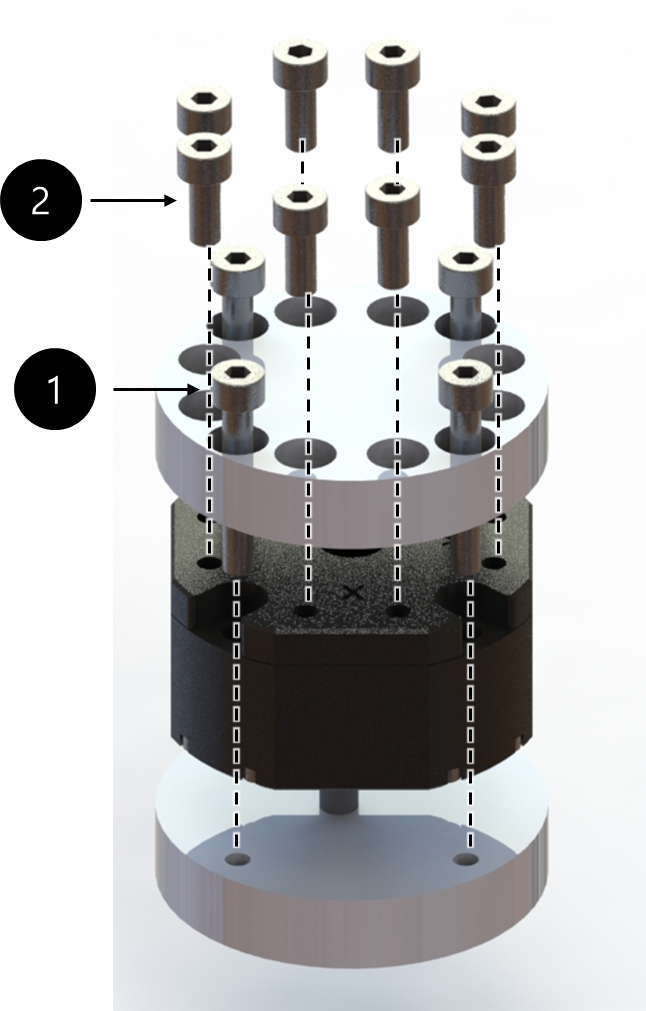
⚠️ M3 bolt 1.5Nm required for tightening (Need Locatiting)
M4 bolt 3.6Nm required for tightening There are two types of bolts used.
-
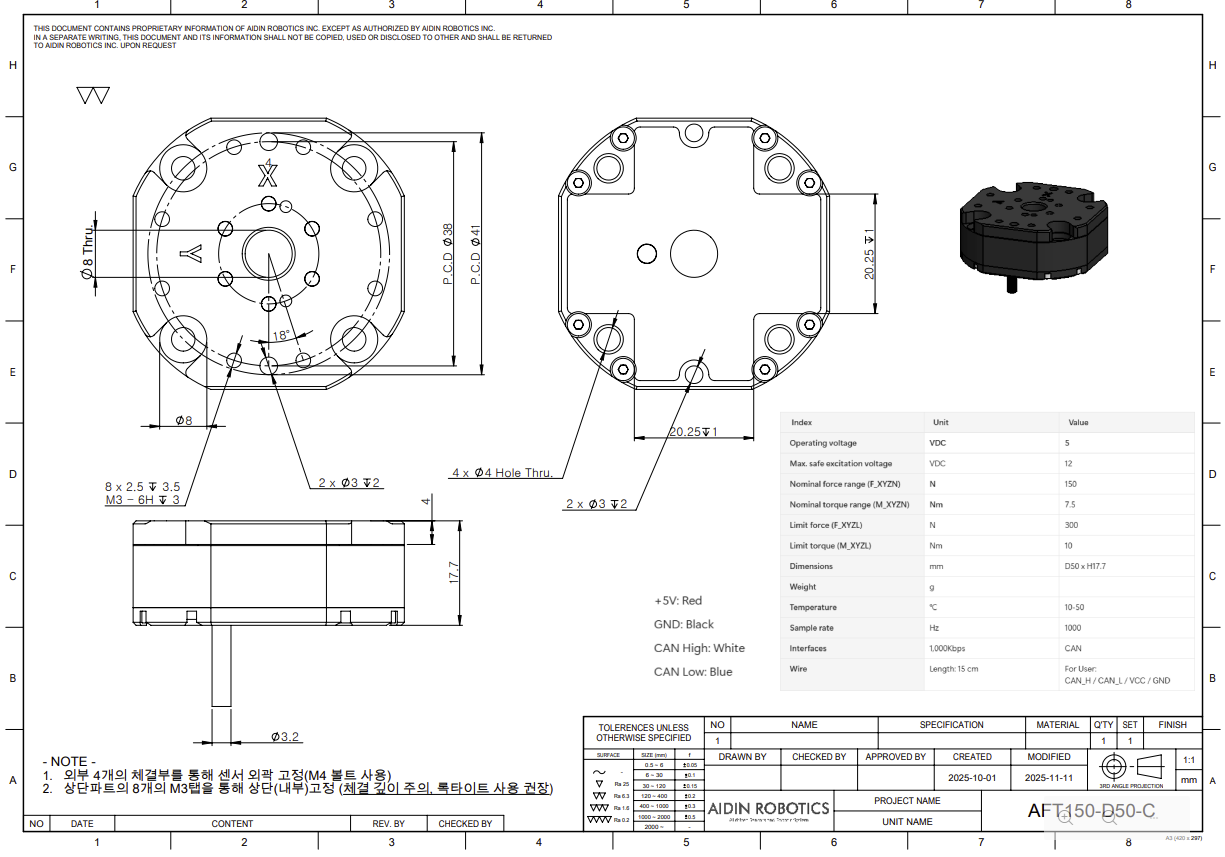
The first type is M4 bolt, which fixes the sensor to the bottom part, requires a length of at least 12.5 mm.
-
The second type is M3 bolt, which is used for the top part that contacts the upper plate of the sensor, must not protrude more than 3 mm into the sensor. Please take caution when assembling.
-
Performance cannot be guaranteed and A/S not possible when disassembling internal/external bolts
- Sensor tightening order
- CAUTION OF CABLE CUTTING AND EXCESS PULLING
- Secure the sensor line with the robot so that it does not pull as it moves
- Do not fix it to the robot using cable ties, etc., or use cable ties to fix it in a bundle shape like other wires
- We recommend that you use Velcro to fix it with the robot, and please use Velcro to fix it when fixing it in a bundle form with other lines
💡 Performance CANNOT be guaranteed if not followed to the tightening torque guide.
💡 If the sensor line is not fixed to the robot, the output signal may have a noise due to the pulled by robot
2.3 Axes and Drawings
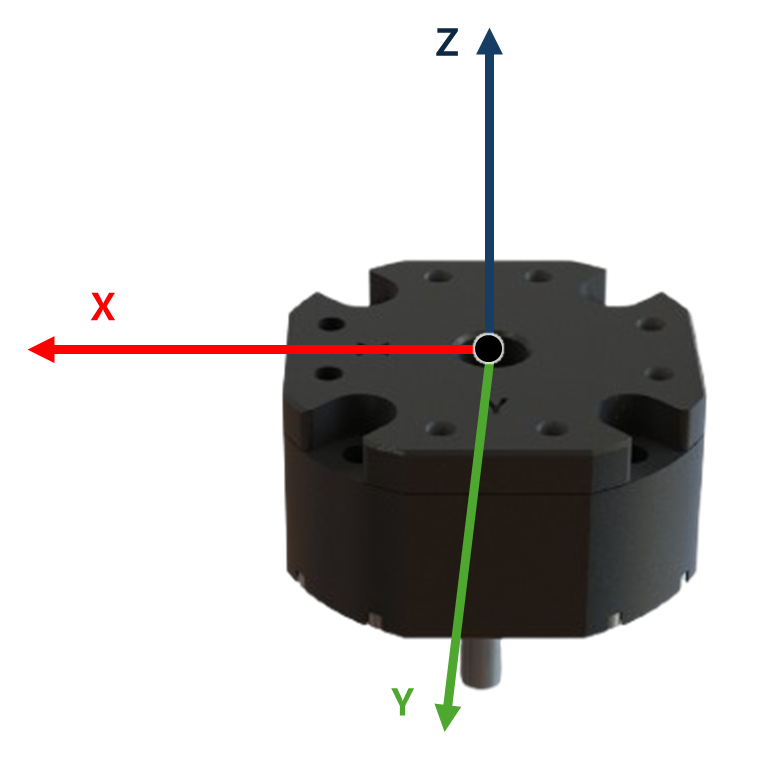
Drawing File :2.3 Wiring
2.4 Cable
- Length: 15cm
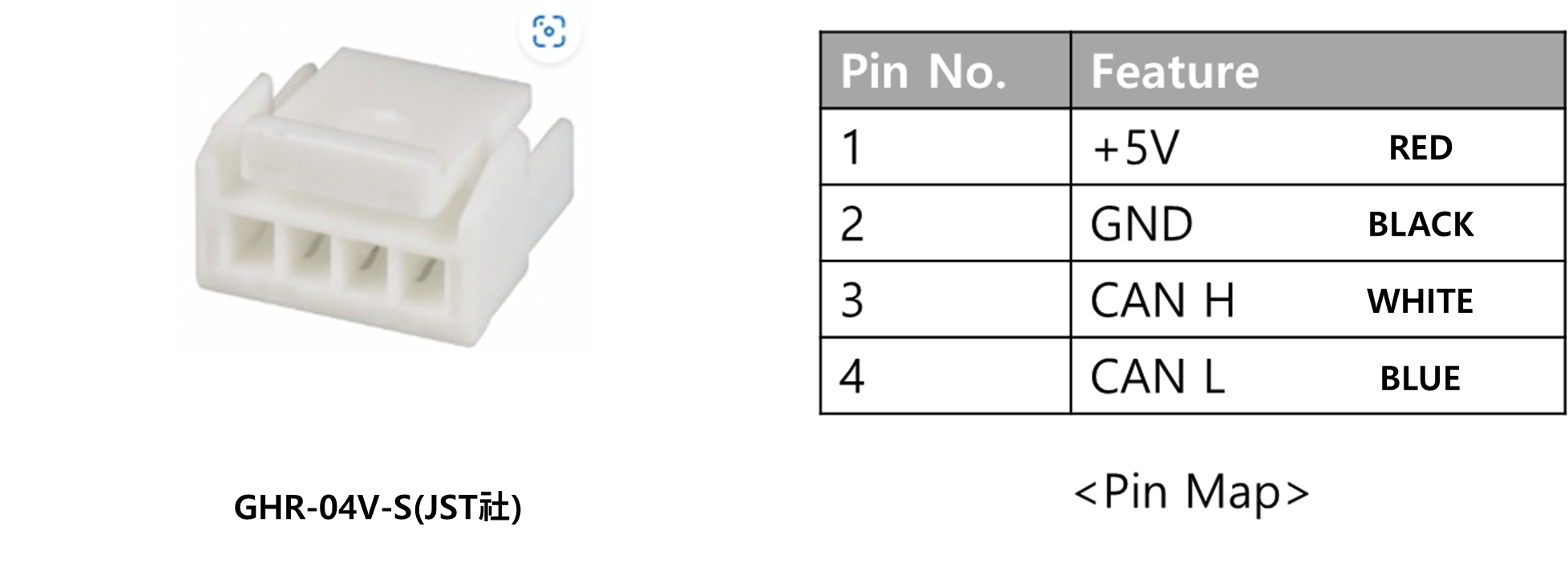
💡 To acquire CAN data, a 120 Ω termination resistor is required between CAN H and CAN L.
3. Communication
3.1 Default CAN Setting
- The output rate can be changed from 100 Hz to 1000 Hz
- Please refer to the “3.2 User Commands ” below for how to change it
- CAN-2.0
- Nominal bitrate : 1Mbps
- Data bitrate : 1Mbps
- RX ID MASK : 0x220~0x22F, 0x320~0x32F
- CAN-FD
- Nominal bitrate : 1Mbps
- Data bitrate : 4Mbps (BRS mode)
- RX ID MASK : 0x220~0x22F, 0x320~0x32F
- CAN-FD parameter setting example using PCAN device (refer 3. Additional information)
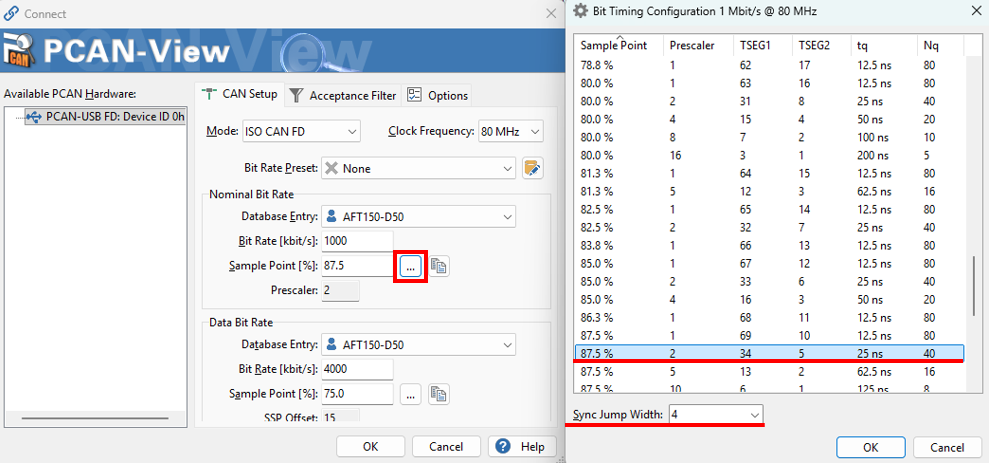
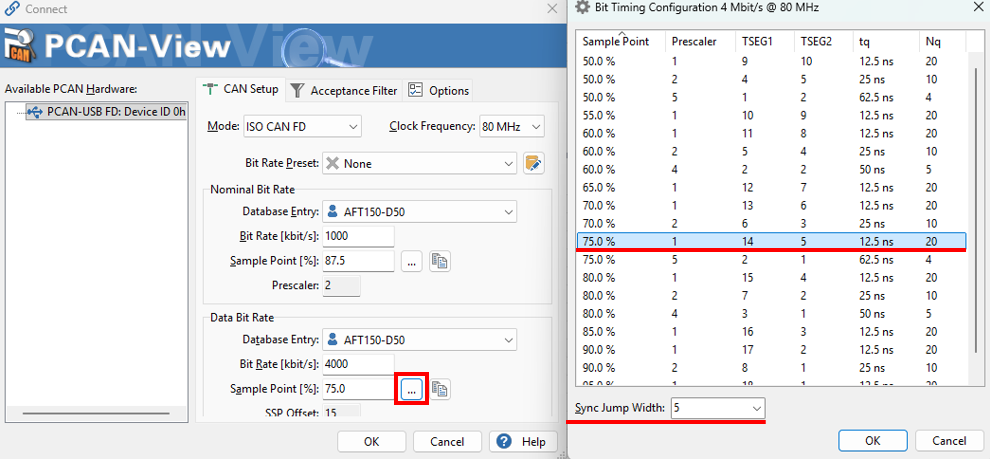
3.2 User Commands
- RX CAN IDs : 0x220 (CAN 2.0) , 0x320 (CAN FD) TX CAN IDs : The pre-configured TX CAN IDs are 0x230 (CAN 2.0) and 0x330 (CAN FD). Accordingly, the 'current TX CAN ID' in the table below is represented as [0x30, 0x02] or [0x30, 0x03] (LSB first).
- Data Transmission Procedure
The sensor does not automatically output data upon power-up. To receive data, the host must send the CAN MODE configuration command followed by the TRANSMIT DATA request command.
Example:
CAN MODE: ID:
0x220, Data:0x30 0x02 0x04 0x01TRANSMIT DATA: ID:0x220, Data:0x30 0x02 0x03 0x02
| COMMAND | RX CAN ID | Data[0] | Data[1] | Data[2] | Data[3] See table below | Data[4] | Data[5] |
|---|---|---|---|---|---|---|---|
| SENSOR TX CAN ID SET | 0x220 0x320 | current TX CAN ID (LSB) | current TX CAN ID (MSB) | 0x01 | 0x01 0x02 | TX CAN 2.0 ID(LSB) TX CAN FD ID(LSB) | TX CAN 2.0 ID(MSB) TX CAN FD ID(MSB) |
| BIAS | 0x02 | ||||||
| TRANSMIT DATA | 0x03 | 0x01 0x02 0x03 0x04 0x05 0x06 | |||||
| CAN MODE | 0x04 | 0x01 0x02 0x03 | |||||
| SAMPLE RATE SET | 0x05 | 0x01 0x02 0x03 0x04 | |||||
| FD PARAMETERSET | 0x06 | 0x01 0x02 0x03 0x04 | |||||
| SERIAL NUMBER CONFIRM | 0xFF | 0xFE | 0xFB | ||||
| TX CAN ID CONFIRM | 0xFF | 0xFE | 0xFC | 0x01 0x02 | |||
| FACTORY RESET | 0xFF | 0xFE | 0xFD |
| COMMAND | Data[3] DESCRIPTION |
|---|---|
| SENSOR TX CAN ID SET | 0x01 : TX CAN 2.0 ID SET ex) ID(LSB) = 0x23, ID(MSB) = 0x01, Resulting ID 0x123 0x02 : TX CAN FD ID SET ex) ID(LSB) = 0x56, ID(MSB) = 0x04, Resulting ID 0x456 |
| BIAS | Bias |
| TRANSMIT DATA | 0x01 : INT without temperature compensation 0x02 : INT with temperature compensation 0x03 : INT Combined without temperature compensation (Unsupported in CAN 2.0) 0x04 : INT Combined with temperature compensation (Unsupported in CAN 2.0) 0x05 : Float Combined without temperature compensation (Unsupported in CAN 2.0) 0x06 : Float Combined with temperature compensation (Unsupported in CAN 2.0) |
| CAN MODE | 0x01 : CAN 2.0 mode 0x02 : CAN FD mode BRS OFF (Effective from 2026.06.19) 0x03 : CAN FD mode BRS ON (Effective from 2026.06.19) |
| SAMPLE RATE SET | 0x01 : RATE 100Hz (Default) 0x02 : RATE 250Hz 0x03 : RATE 500Hz 0x04 : RATE 1000Hz |
| FD PARAMETERSET | 0x01 : FDSET1 0x02 : FDSET2 0x03 : FDSET3 (Default) 0x04 : FDSET4 |
| SERIAL NUMBER CONFIRM | (To Be Determined) |
| TX CAN ID CONFIRM | 0x01 : TX CAN 2.0 ID : data field not used (DLC = 0) 0x02: TX CAN FD ID : data field not used (DLC = 0) |
| FACTORY RESET | FDSET3(Default) RATE 100Hz (Default) Zero Bias (Default) current TX CAN2.0 ID : 0x230 (Default), current TX CANFD ID : 330 (Default) |
3.3 Sensor Data Output
💡 To stabilize the sensor signal, it is recommended to have a running time of about 30 minutes.
Please leave the sensor data on for at least 10 minutes before using it The first 10 minutes of sensor output data can cause data to flow.
Force INT Transmitting mode (data[2] : 0x03, data[3] : 1 or 2)
| INDEX | TX CAN ID | DLC | data[0] | data[1] | data[2] | data[3] | data[4] | data[5] |
|---|---|---|---|---|---|---|---|---|
| FINT | 2.0 ID 0x230 FD ID 0x330 | 6 | Fx(LSB) | Fx(MSB) | Fy(LSB) | Fy(MSB) | Fz(LSB) | Fz(MSB) |
- Fx Output = Fx(MSB)*256 + Fx(LSB)
- Fy Output = Fy(MSB)*256 + Fy(LSB)
- Fz Output = Fz(MSB)*256 + Fz(LSB)
- Force[N] = Force Output/100
💡 The final calculated Force and Torque values need to be cast into 16-bit integers.
Torque INT Transmitting mode (data[2] : 0x03, data[3] : 1 or 2)
| INDEX | TX CAN ID | DLC | data[0] | data[1] | data[2] | data[3] | data[4] | data[5] |
|---|---|---|---|---|---|---|---|---|
| TINT | 2.0 ID 0x231 FD ID 0x331 | 6 | Tx(LSB) | Tx(MSB) | Ty(LSB) | Ty(MSB) | Tz(LSB) | Tz(MSB) |
- Tx Output = Tx(MSB)*256 + Tx(LSB)
- Ty Output = Ty(MSB)*256 + Ty(LSB)
- Tz Output = Tz(MSB)*256 + Tz(LSB)
- Torque[Nm] = Torque Output/1000
💡 The final calculated Force and Torque values need to be cast into 16-bit integers.
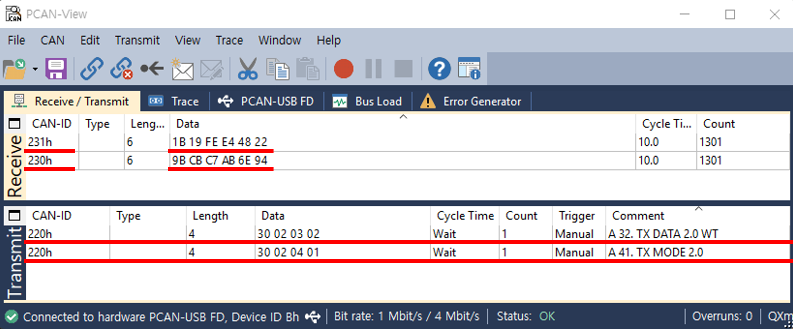
Combined INT Transmitting mode (data[2] : 0x03, data[3] : 3 or 4)
| INDEX | TX CAN ID | DLC | data[0] | data[1] | data[2] | data[3] | data[4] | data[5] |
|---|---|---|---|---|---|---|---|---|
| CINT | FD ID 0x332 | 12 | Fx(LSB) | Fx(MSB) | Fy(LSB) | Fy(MSB) | Fz(LSB) | Fz(MSB) |
| INDEX | data[6] | data[7] | data[8] | data[9] | data[10] | data[11] |
|---|---|---|---|---|---|---|
| CINT | Tx(LSB) | Tx(MSB) | Ty(LSB) | Ty(MSB) | Tz(LSB) | Tz(MSB) |
- Fx Output = Fx(MSB)*256 + Fx(LSB)
- Fy Output = Fy(MSB)*256 + Fy(LSB)
- Fz Output = Fz(MSB)*256 + Fz(LSB)
- Tx Output = Tx(MSB)*256 + Tx(LSB)
- Ty Output = Ty(MSB)*256 + Ty(LSB)
- Tz Output = Tz(MSB)*256 + Tz(LSB)
- Force[N] = Force Output/100
- Torque[Nm] = Torque Output/1000
💡 The final calculated Force and Torque values need to be cast into 16-bit integers
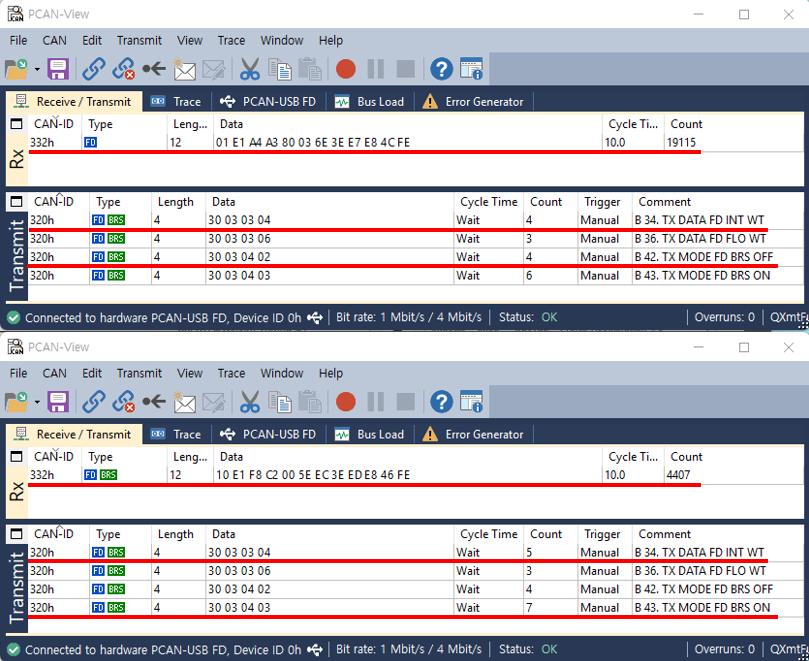
Combined Float Transmitting mode (data[2] : 0x03, data[3] : 5 or 6)
| INDEX | TX CAN ID | DLC | data[0~3] | data[4~7] | data[8~11] | data[12~15] | data[16~19] | data[20~23] |
|---|---|---|---|---|---|---|---|---|
| CFLOAT | FD ID 0x332 | 24 | Fx | Fy | Fz | Tx | Ty | Tz |
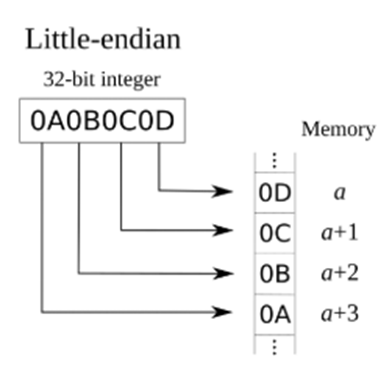
uint32_t Fx_Raw = (Fx(MSB) << 24) | (Fx(3rd) << 16) | (Fx(2nd) << 8) | (Fx(LSB));
float    Fx_Output = *(float *)&Fx_Raw;
uint32_t Fy_Raw = (Fy(MSB) << 24) | (Fy(3rd) << 16) | (Fy(2nd) << 8) | (Fy(LSB));
float    Fy_Output = *(float *)&Fy_Raw;
uint32_t Fz_Raw = (Fz(MSB) << 24) | (Fz(3rd) << 16) | (Fz(2nd) << 8) | (Fz(LSB));
float    Fz_Output = *(float *)&Fz_Raw;
uint32_t Tx_Raw = (Tx(MSB) << 24) | (Tx(3rd) << 16) | (Tx(2nd) << 8) | (Tx(LSB));
float    Tx_Output = *(float *)&Tx_Raw;
uint32_t Ty_Raw = (Ty(MSB) << 24) | (Ty(3rd) << 16) | (Ty(2nd) << 8) | (Ty(LSB));
float    Ty_Output = *(float *)&Ty_Raw;
uint32_t Tz_Raw = (Tz(MSB) << 24) | (Tz(3rd) << 16) | (Tz(2nd) << 8) | (Tz(LSB));
float    Tz_Output = *(float *)&Tz_Raw;
- Force[N] = Force Output
- Torque[Nm] = Torque Output
💡 The final calculated Force and Torque values need to be cast into float.
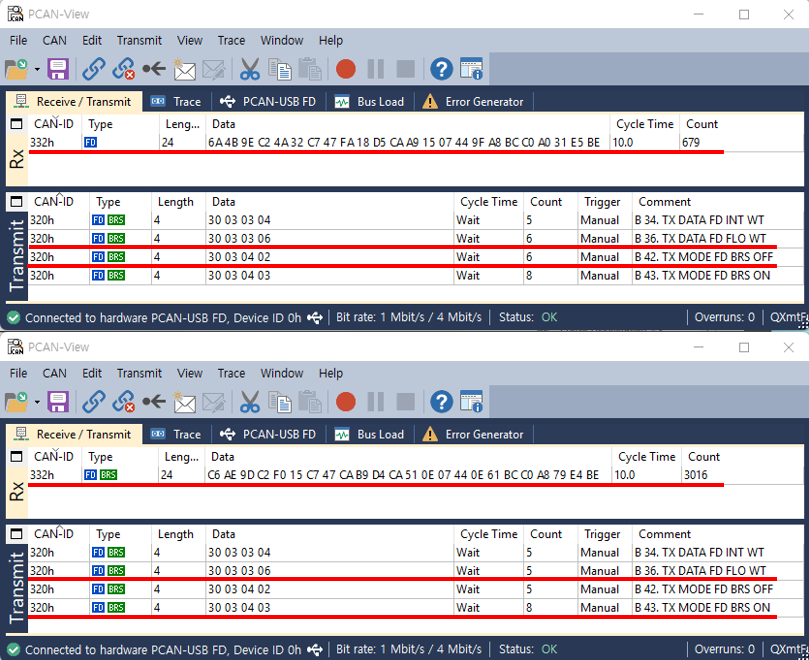
💡 The calculation of the data must follow the little-endian format.
4. Additional information
4.1 USB-to-CAN interfaces
PCAN-USB FD Device (USB to CAN FD)
- You may use a different CAN-enabled board, but use peak-system converter to use the sample program
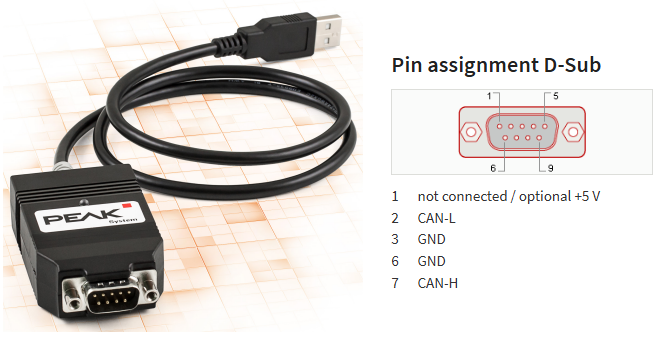
- Device Item number IPEH-004022
- PCAN-View (Windows Software for Displaying)
FAQ
(내용 준비 중)
Revision History
| Date | Description |
|---|---|
| 2026.09.15 | Initial release (Current version) |