Smart 6-axis Force Torque Sensor, AFT200-D80-EC
Rev. 2026.09.15
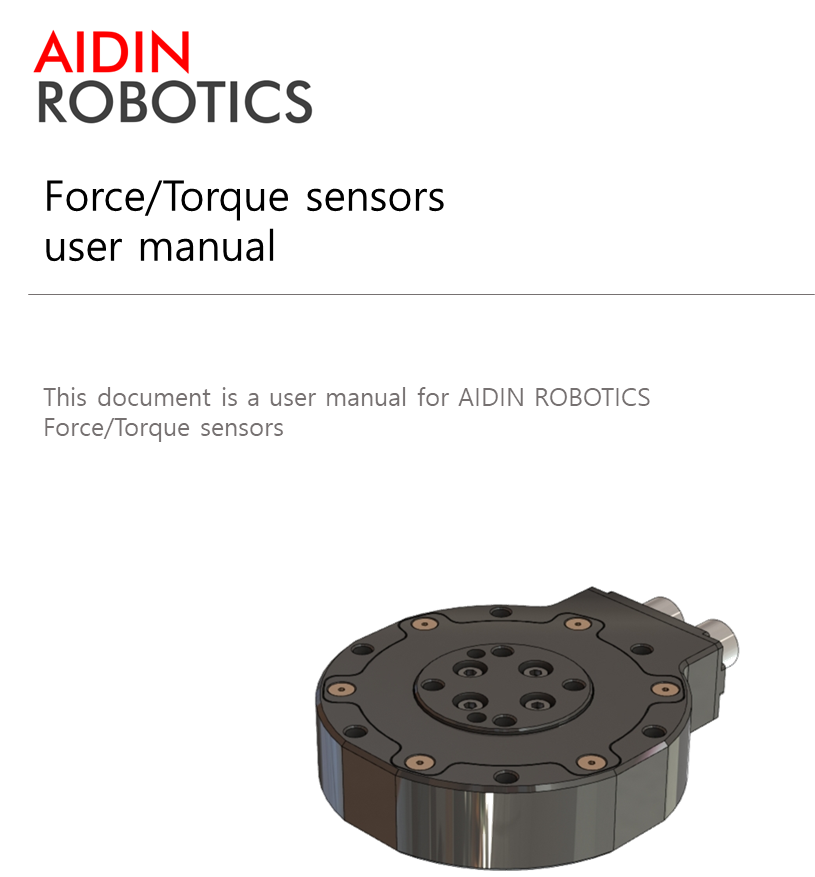
FOREWORD
Thank you for purchasing our Force Torque sensor. This manual contains the information necessary for the correct use of the AIDIN ROBOTICS AFT200-D80 sensor. Please carefully read this manual when using this software. Please note that the basic performance of the product will not be exhibited when the robot system is used out of conditions. This manual describes possible dangers and consequences using Force Torque sensor. Be sure to comply with safety precautions written in this manual to use safety and correctly.
NOTICE
This manual Do NOT allow copy, reproduction or share without authorization of AIDIN ROBOTICS. Please notify us any errors in this manual or the provided instructions.
MANUFACTURER
AIDIN ROBOTICS
SAFETY PRECAUTIONS
Installation of Force Torque sensor MUST be performed by qualified personnel in accordance with national and local codes. Please carefully read this manual when using this software.
WARNING & CAUTION
🚫 This symbol indicates that a danger of possible serious injury or death exists if the associated instructions are not followed properly.
⚠️ This symbol indicates that a danger of possible harm to people or physical damage to equipment and facilities exists if the associated instructions are not followed properly.
✅ AFT200-D80-EC sensor from AIDIN ROBOTICS meets CE-certified “A Class”
1. Introduction
1.1 Smart 6-axis Force Torque Sensor, AFT200-D80
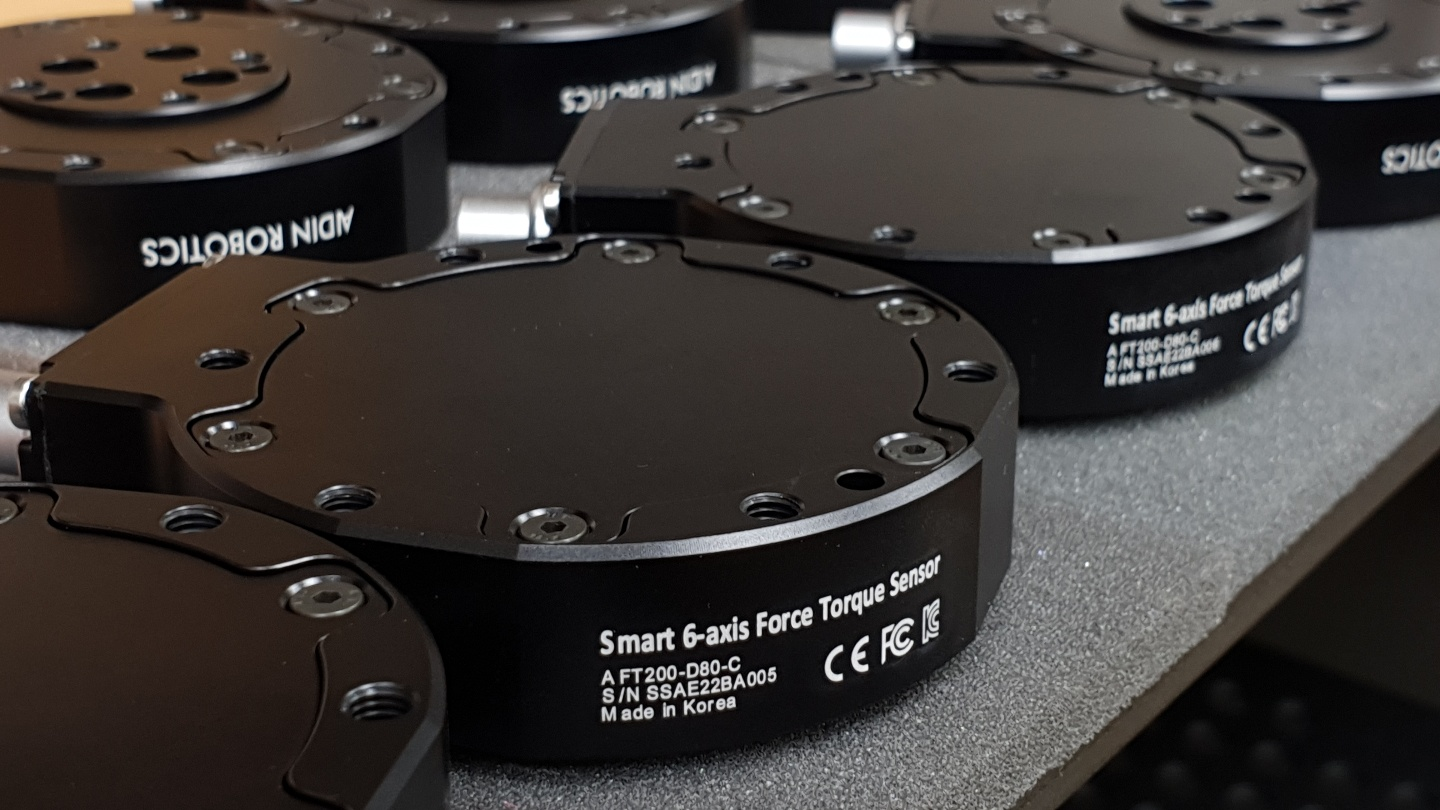
1.2 Key features
- Smart 6-axis force/torque sensor
- All-in-one sensor (No additional amplifier)
- Digital output communications (EtherCAT)
- Easy installation and data collection
- Grippers, robot hands, collaborative robot, industrial robot
1.3 Specs.
| Index | Unit | Value |
|---|---|---|
| Operating voltage | VDC | 12 |
| Max. safe excitation voltage | VDC | 24 |
| Nominal force range | N | 200 |
| Nominal torque range | Nm | 15 |
| Limit force (Fxyz) | N | 300 |
| Limit torque | Nm | 22.5 |
| Force Resolution | N | 0.15 |
| Torque Resolution | Nm | 0.015 |
| Force Noise-free resolution (STD) | N | 0.4 |
| Torque Noise-free resolution (STD) | Nm | 0.025 |
| Maximum sample rate | Hz | 1,000 |
| Dimensions | mm | D80 x H21.5 |
| IP rating | IP65 | |
| Operating temperature | 10-50℃ |
1.4 Flyer
2. Installation Guide
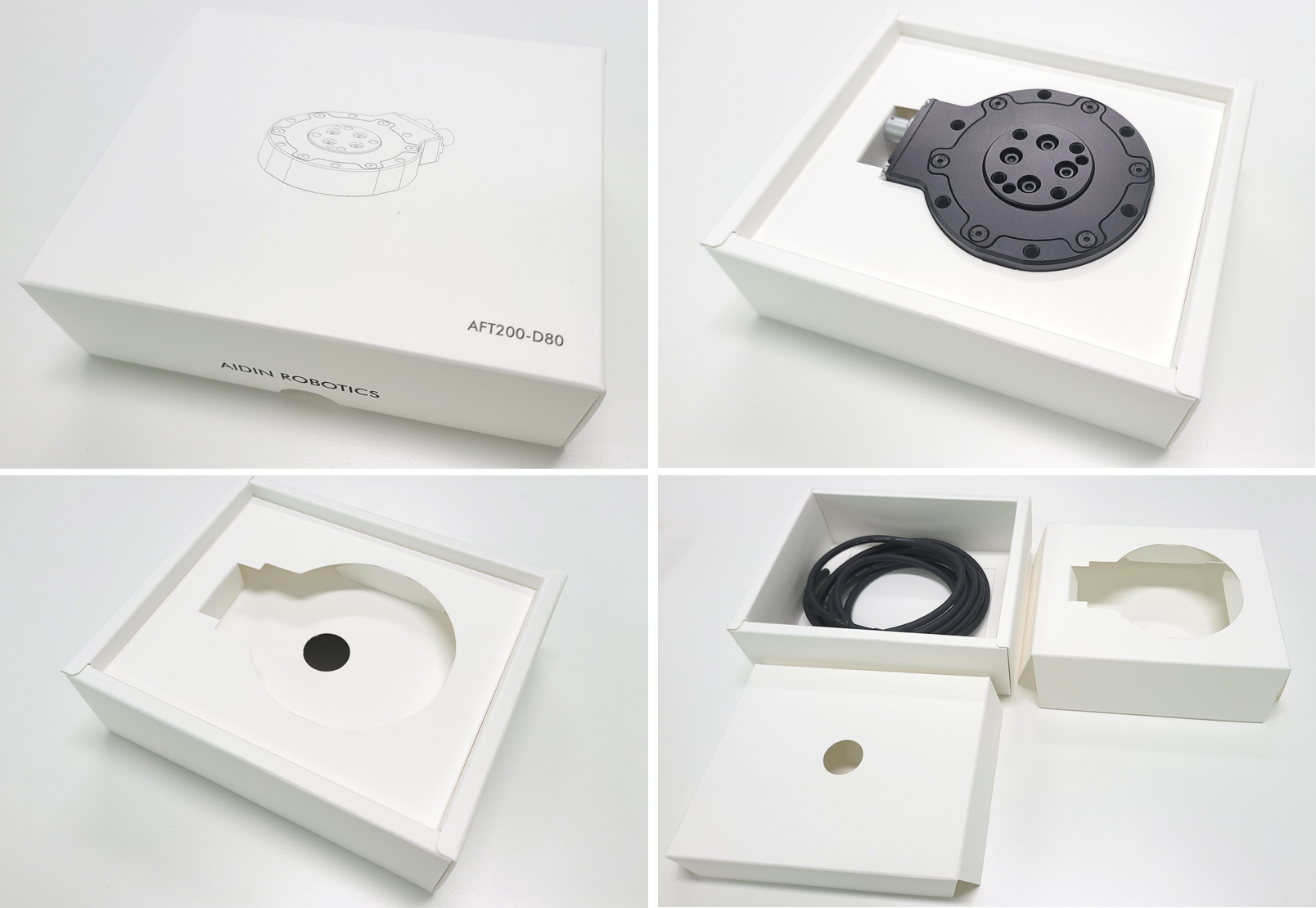
2.1 Basic Components
- AFT200-D80 x 1 EA
- 1.5m Cable x 1 EA
2.2 Mounting
- M5 bolt 5.2Nm required for tightening
- Performance cannot be guaranteed and A/S not possible when disassembling internal/external bolts
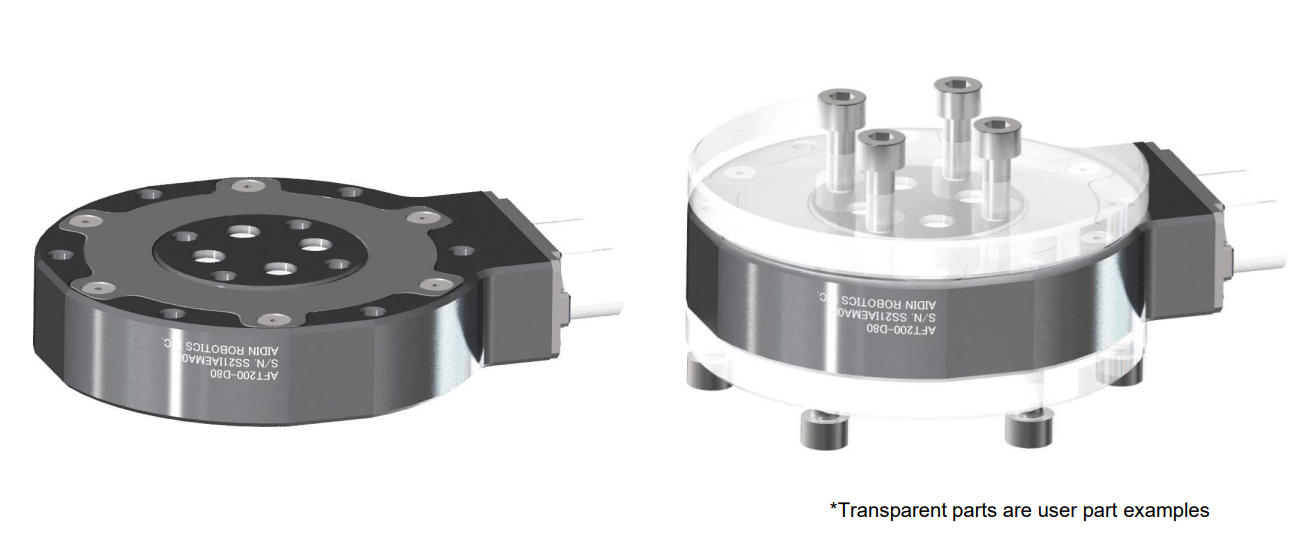
- Sensor tightening order
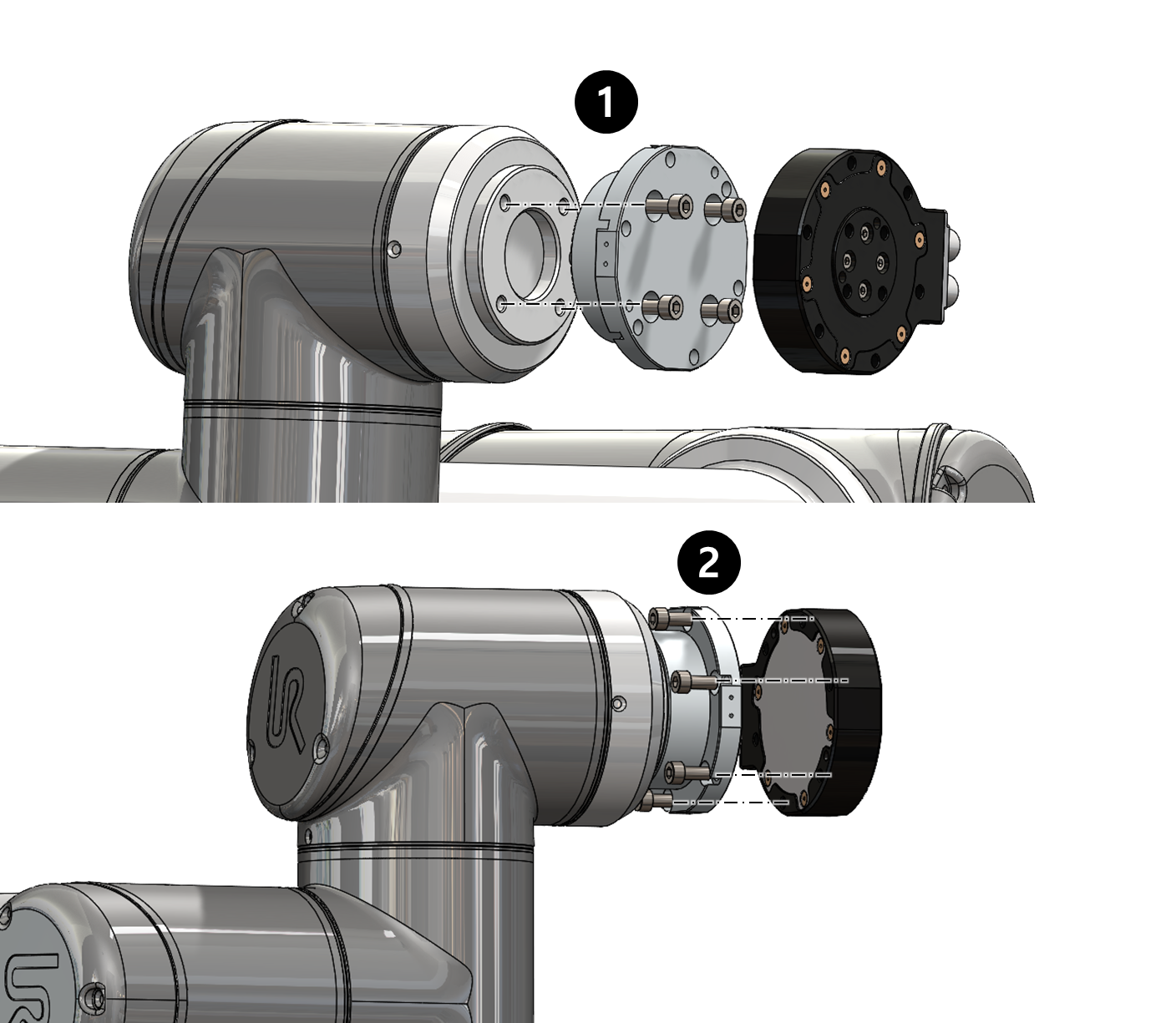
- CAUTION OF CABLE CUTTING AND EXCESS PULLING
- Secure the sensor line with the robot so that it does not pull as it moves
- Do not fix it to the robot using cable ties, etc., or use cable ties to fix it in a bundle shape like other wires
- We recommend that you use Velcro to fix it with the robot, and please use Velcro to fix it when fixing it in a bundle form with other lines
💡 Performance CANNOT be guaranteed if not followed to the tightening torque guide.
💡 If the sensor line is not fixed to the robot, the output signal may have a noise due to the pulled by robot
💡 Please check More detail setup guide as follow:
2.3 AXIS & Drawings
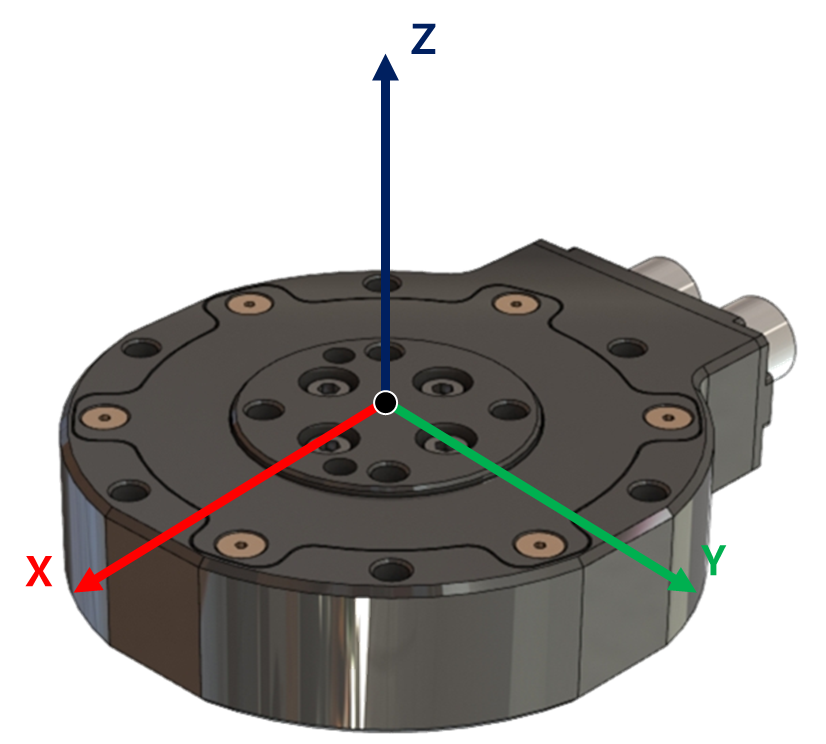
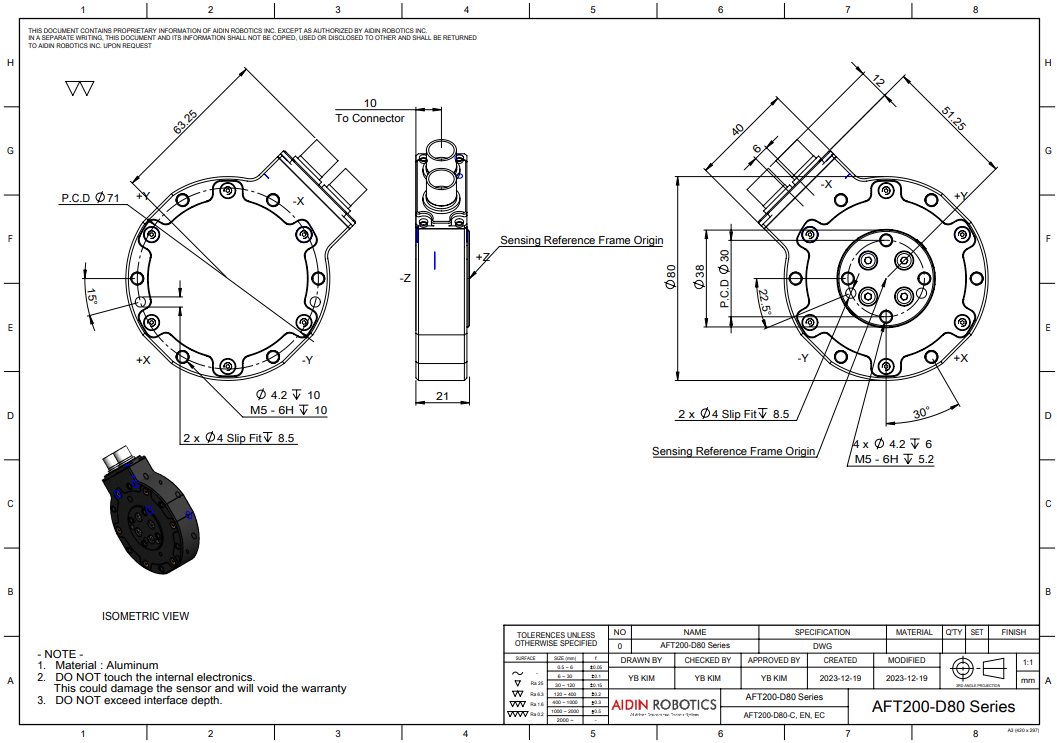
Drawing File :
💡
Port Location Notice
- EtherCAT Type model has two ports: IN and OUT.
- Ethernet Type model has one port, located on the left side.
- CAN Type model has one port, located on the right side. STEP File:
- 📎 AFT200-D80-EC_배포용.zip
2.3 Wiring
The EtherCAT device are provided with a POE injector and a 12-24V AC/DC power supply. The sensor is complying with 802.3af Mode A protocol, but the power is being delivered by only one unused pair of the Cat5e ethernet cable. Make sure DO NOT apply the over voltage to the sensor cable. The user should connect the sensor cable to the “POE” marked port of the injector. Other POE Injectors compatible with the 802.3af Mode A can be used with 12-24V supply voltage.
2.3.1 Pin out
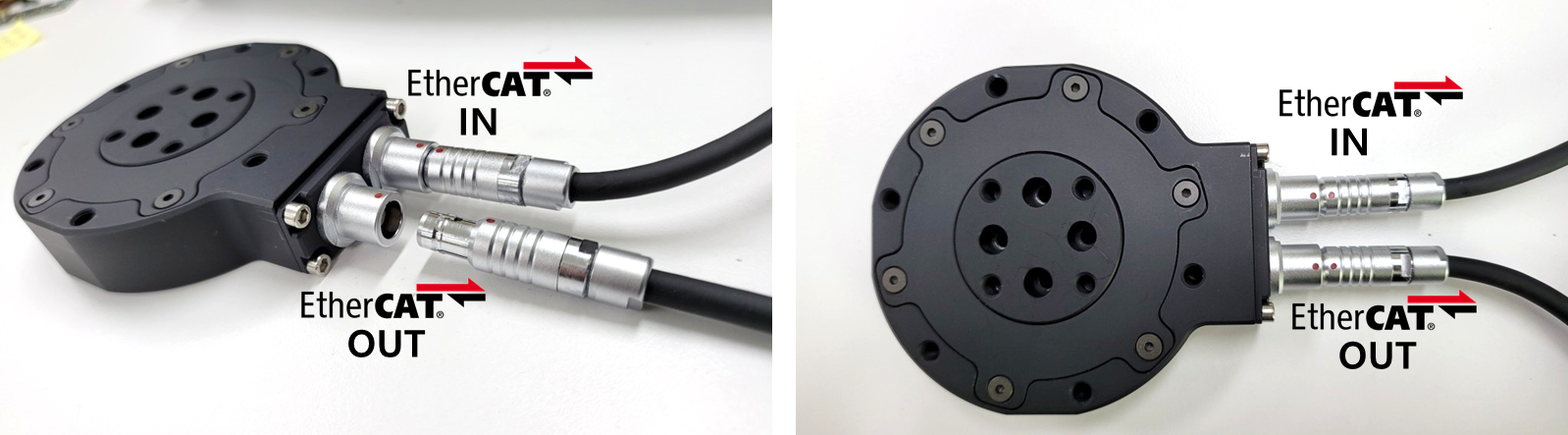
- Use POE Connector to connect Power & EtherNET signal
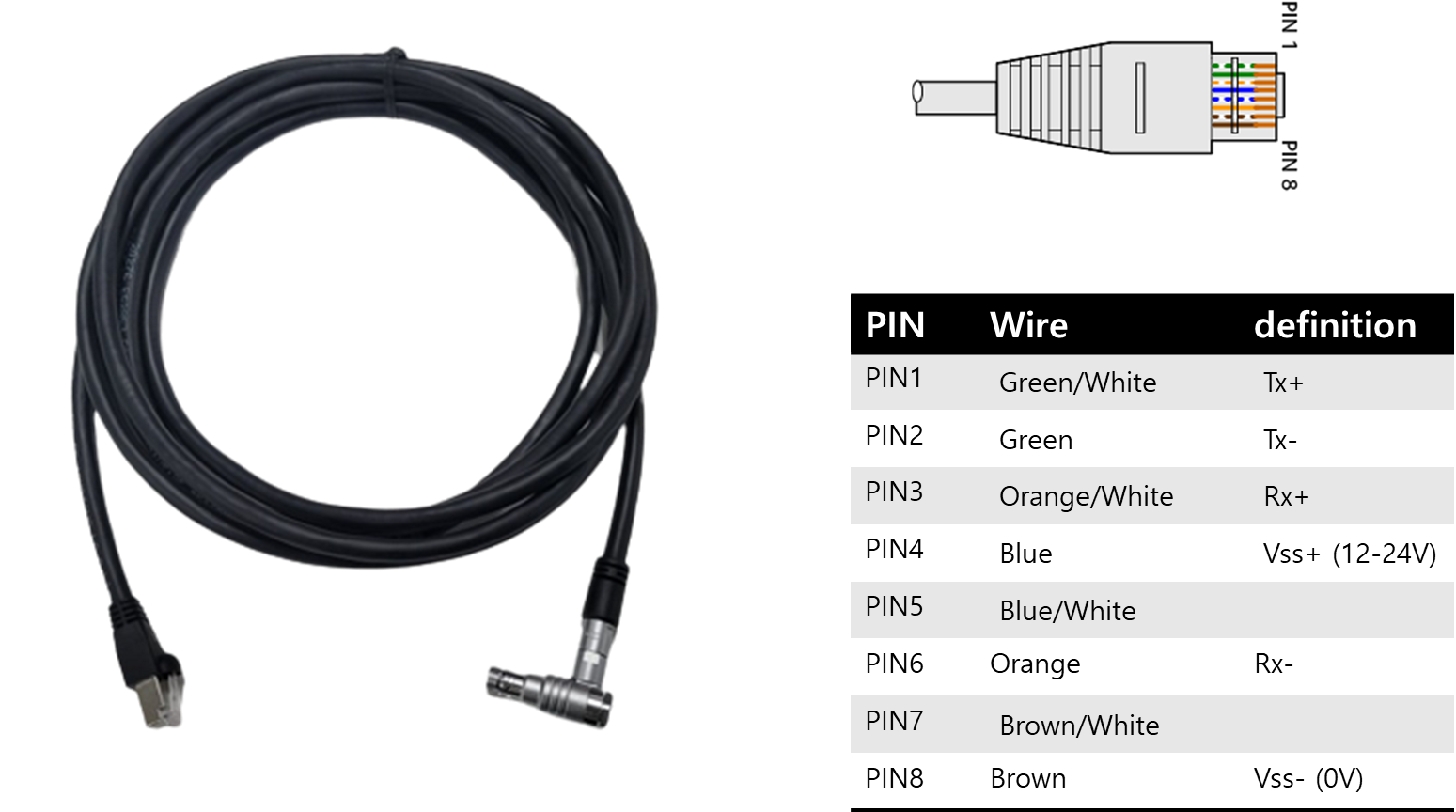
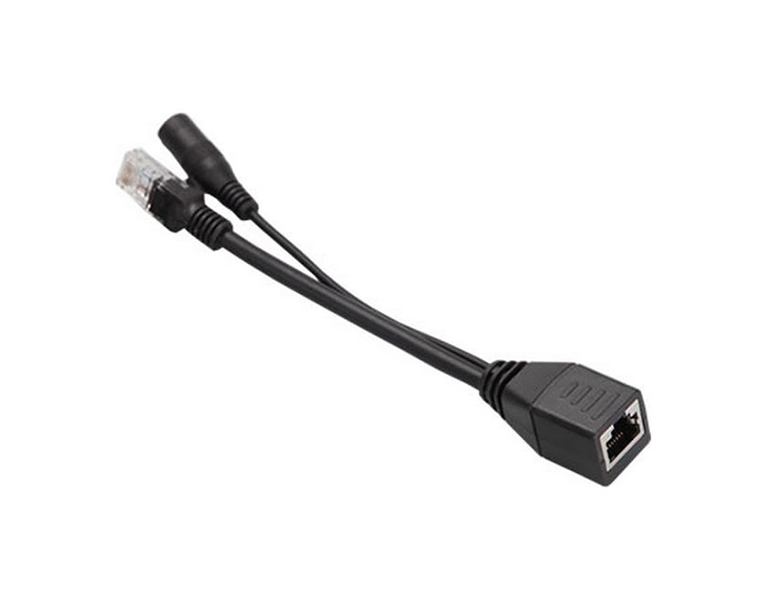
| Cable wires color | EtherCAT Signal | |
| 1 | Green/White | TX+ |
| 2 | Green | TX- |
| 3 | Orange/White | RX+ |
| 4 | Blue | 12V |
| 5 | Blue/White | NC |
| 6 | Orange | RX- |
| 7 | Brown/White | NC |
| 8 | Brown | GND |
2.5 EtherCAT interface
The AFT200-D80-EC model support the RUN state where the sensor is providing the force/torque measurements. Also the IMU measurements can be activated by using activating signal to AFT200-D80-EC sensor. To activate the IMU signal or biasing the sensor signal, please follow the instructor in section 2.6. The EtherCAT interface is used to give the users the following capabilities: • Read the Product Number, Serial Number, etc. • Read Force/Torque Data → Force [N] = Force output/100-300, Torque = Torque output/500-50 • Read IMU data → Acceleration [m/s^2]= (Acceleration value – 32767)/1000 → gyroscope [ ˚/s] = (gyroscope value – 32767)/16.4
2.5.1 PDO interface The PDO interface exchanges data in real time with the F/T sensor. The PDO mapping used is given in the following:
2.5.1.1 RxPDO1: Object 0x1600 Digital Output
| Name Type | Index | Subindex | Size | Bit Size | Access |
| Digital Output | 0x7000 | 0x00 | BOOL | 1 | RO |
| BIAS_ON | 0x7000 | 0x01 | BOOL | 1 | RO |
| ACC_ON | 0x7000 | 0x02 | BOOL | 1 | RO |
| GYRO_ON | 0x7000 | 0x03 | BOOL | 1 | RO |
| NC | 0x7000 | 0x04 | BOOL | 1 | RO |
2.5.1.2 TxPDO1: Object 0x1A00 Digital Output
| Name Type | Index | Subindex | Size | Bit Size | Access |
| Status | 0x6000 | 0x00 | SINT | 8 | RO |
| Force x | 0x6000 | 0x01 | REAL | 32 | RO |
| Force y | 0x6000 | 0x02 | REAL | 32 | RO |
| Force z | 0x6000 | 0x03 | REAL | 32 | RO |
| Torque x | 0x6000 | 0x04 | REAL | 32 | RO |
| Torque y | 0x6000 | 0x05 | REAL | 32 | RO |
| Torque z | 0x6000 | 0x06 | REAL | 32 | RO |
| Out of Range | 0x6000 | 0x07 | REAL | 32 | RO |
| Out of Range status | 0x6000 | 0x08 | REAL | 32 | RO |
| Acceleration x | 0x6000 | 0x09 | REAL | 32 | RO |
| Acceleration y | 0x6000 | 0x0a | REAL | 32 | RO |
| Acceleration z | 0x6000 | 0x0b | REAL | 32 | RO |
| Angular Rate x | 0x6000 | 0x0c | REAL | 32 | RO |
| Angular Rate y | 0x6000 | 0x0d | REAL | 32 | RO |
| Angular Rate z | 0x6000 | 0x0e | REAL | 32 | RO |
| Temperature | 0x6000 | 0x0f | REAL | 32 | RO |
2.5.2 SDO interface The SDO data configures the sensor and reads the manufacturing and calibration data. This section lists dictionary objects specific to the EtherCAT F/T sensor application; it does not list objects that are a required part of the EtherCAT standard. These dictionary objects can also be found in the ESI file on the website
| Object | Name | Type | Description | |
| 0x2000 | 0 | Status | RO | |
| 0x6000 | 0 | Sensor Data | RO | Used to read the Force/Torque data, IMU etc. from the sensor |
| 0x7000 | 0 | Digital Output | RO |
💡 To stabilize the sensor signal, it is recommended to have a running time of about **30 minutes.
* P**lease leave the sensor data on for at least 10 minutes before using it
💡 The first 10 minutes of sensor output data can cause data to flow.
2.6 Force/Torque Out of Range
The sensor can operate up to its nominal capacity, while a single axis load. On Nominal capacity reading is incorrect and invalid. The nominal capacity of composite loading is The following diagram illustrates a complex loading scenario. The sensor cannot operate outside the normal operating area
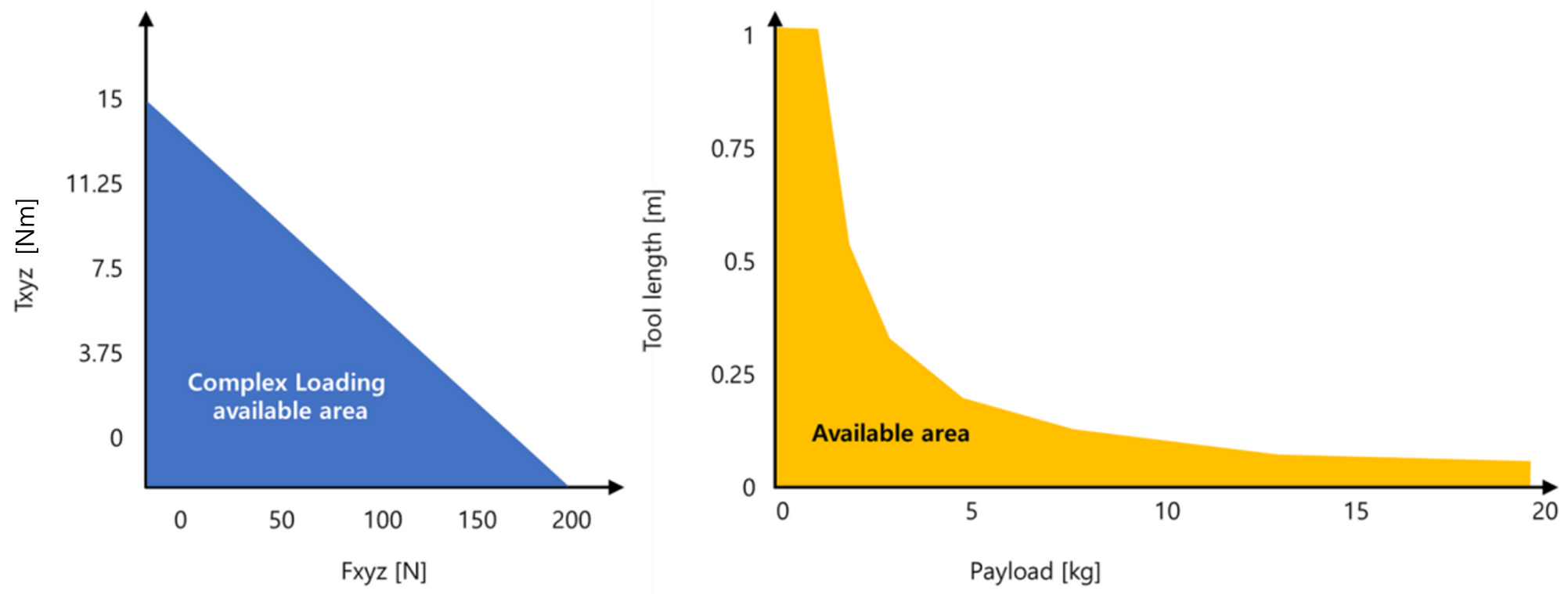
The following graph shows the range of payloads and tool lengths that can be used with AFT200-D80-EC sensor for applications requiring high or moderate precision.
F/T load is outside the sensor’s detection capability. TxPDO1[0x6000, Index: 0x08] shows the value type and TxPDO1[0x6000, Index: 0x09] shows the status.
• The total percentage of the calibrated range used by Fxy and Tz axes is greater than 105%. Refer to the following Fxy, Tz equation.
• The total percentage of the calibrated range used by Fz and Txy axes is greater than 105%. Refer to the following Fz, Txy equation.
3. SOFTWARE
3.1 Testing the EtherCAT in Windows application ( TwinCAT3 )
- 📎 EtherCAT_manual.pdf
3.1.1 ESI(EtherCAT Slave Information) XML file for EtherCAT
- XML file name : AFT200-D80-EC.xml
- 📎 AFT200_D80_EC.xml
- Download the XML file and paste it to the installed directory of TwinCAT. “C:/TwinCAT/3.1/Config/Io/EtherCAT” 3.1.2. Sequence of Testing
- Create a TwinCAT project using Visual Studio.
- Connect a LAN cable to EtherCAT Master (Ethernet adapter).
- Turn on AFT sensor.
- Scan the device.
- Activate the TwinCAT in free-run mode
- Observe the output values of PDO (Process Data Object) and SDO (Service Data Object)
3.2 Testing the EtherCAT in Linux application ( SOEM ) 3.2.1 clone the SOEM source code from the following page
git clone https://github.com/OpenEtherCATsociety/SOEM
- Follow the installation steps according to the SOEM webpage
mkdir buildcd buildcmake ..make
- Copy the following code and paste to the simpletest.c code
/** \file
 * \brief Example code for Simple Open EtherCAT master
 *
 * Usage : simple_test [ifname1]
 * ifname is NIC interface, f.e. eth0
 *
 * This is a minimal test.
 *
 * (c)Arthur Ketels 2010 - 2011
 */

#include <stdio.h>
#include <string.h>
#include <inttypes.h>

#include "ethercat.h"

#define EC_TIMEOUTMON 500

char IOmap[4096];
OSAL_THREAD_HANDLE thread1;
int expectedWKC;
boolean needlf;
volatile int wkc;
boolean inOP;
uint8 currentgroup = 0;
boolean forceByteAlignment = FALSE;

void simpletest(char *ifname)
{
    int i, j, oloop, iloop, chk;
    needlf = FALSE;
    inOP = FALSE;

   printf("Starting simple test\n");

   /* initialise SOEM, bind socket to ifname */
   if (ec_init(ifname))
   {
      printf("ec_init on %s succeeded.\n",ifname);
      /* find and auto-config slaves */

       if ( ec_config_init(FALSE) > 0 )
      {
         printf("%d slaves found and configured.\n",ec_slavecount);

         if (forceByteAlignment)
         {
            ec_config_map_aligned(&IOmap);
         }
         else
         {
            ec_config_map(&IOmap);
         }

         ec_configdc();

         printf("Slaves mapped, state to SAFE_OP.\n");
         /* wait for all slaves to reach SAFE_OP state */
         ec_statecheck(0, EC_STATE_SAFE_OP,  EC_TIMEOUTSTATE * 4);

         oloop = ec_slave[0].Obytes;
         if ((oloop == 0) && (ec_slave[0].Obits > 0)) oloop = 1;
         if (oloop > 8) oloop = 8;
         iloop = ec_slave[0].Ibytes;
         if ((iloop == 0) && (ec_slave[0].Ibits > 0)) iloop = 1;
         if (iloop > 8) iloop = 8;

         printf("segments : %d : %d %d %d %d\n",ec_group[0].nsegments ,ec_group[0].IOsegment[0],ec_group[0].IOsegment[1],ec_group[0].IOsegment[2],ec_group[0].IOsegment[3]);

         printf("Request operational state for all slaves\n");
         expectedWKC = (ec_group[0].outputsWKC * 2) + ec_group[0].inputsWKC;
         printf("Calculated workcounter %d\n", expectedWKC);
         ec_slave[0].state = EC_STATE_OPERATIONAL;
         /* send one valid process data to make outputs in slaves happy*/
         ec_send_processdata();
         ec_receive_processdata(EC_TIMEOUTRET);
         /* request OP state for all slaves */
         ec_writestate(0);
         chk = 200;
         /* wait for all slaves to reach OP state */
         do
         {
            ec_send_processdata();
            ec_receive_processdata(EC_TIMEOUTRET);
            ec_statecheck(0, EC_STATE_OPERATIONAL, 50000);
         }
         while (chk-- && (ec_slave[0].state != EC_STATE_OPERATIONAL));
         if (ec_slave[0].state == EC_STATE_OPERATIONAL )
         {
            printf("Operational state reached for all slaves.\n");
            inOP = TRUE;
                /* cyclic loop */
            for(i = 1; i <= 10000; i++)
            {
               ec_send_processdata();
               wkc = ec_receive_processdata(EC_TIMEOUTRET);

                    if(wkc >= expectedWKC)
                    {
                        printf("Processdata cycle %4d, WKC %d , O:", i, wkc);

                        for(j = 0 ; j < oloop; j++)
                        {
                            printf(" %2.2x", *(ec_slave[0].outputs + j));
                        }

                        printf(" I:");
                     //Test
                        int Fx= *(ec_slave[0].inputs+1)*256+*(ec_slave[0].inputs);
                        int Fy= *(ec_slave[0].inputs+5)*256+*(ec_slave[0].inputs+4);
                        int Fz= *(ec_slave[0].inputs+9)*256+*(ec_slave[0].inputs+8);
                        int Tx= *(ec_slave[0].inputs+13)*256+*(ec_slave[0].inputs+12);
                        int Ty= *(ec_slave[0].inputs+17)*256+*(ec_slave[0].inputs+16);
                        int Tz= *(ec_slave[0].inputs+21)*256+*(ec_slave[0].inputs+20);
                        int Ax= *(ec_slave[0].inputs+25)*256+*(ec_slave[0].inputs+24);
                        int Ay= *(ec_slave[0].inputs+29)*256+*(ec_slave[0].inputs+28);
                        int Az= *(ec_slave[0].inputs+33)*256+*(ec_slave[0].inputs+32);

                        printf(" Fx: %d, Fy: %d,Fz: %d,Tx: %d,Ty: %d,Tz: %d,Ax: %d,Ay: %d,Az: %d, ", Fx, Fy,Fz,Tx,Ty,Tz,Ax,Ay,Az);
                        printf(" T:%"PRId64"\n",ec_DCtime);
                        needlf = TRUE;
                    }
                    osal_usleep(5000);

                }
                inOP = FALSE;
            }
            else
            {
                printf("Not all slaves reached operational state.\n");
                ec_readstate();
                for(i = 1; i<=ec_slavecount ; i++)
                {
                    if(ec_slave[i].state != EC_STATE_OPERATIONAL)
                    {
                        printf("Slave %d State=0x%2.2x StatusCode=0x%4.4x : %s\n",
                            i, ec_slave[i].state, ec_slave[i].ALstatuscode, ec_ALstatuscode2string(ec_slave[i].ALstatuscode));
                    }
                }
            }
            printf("\nRequest init state for all slaves\n");
            ec_slave[0].state = EC_STATE_INIT;
            /* request INIT state for all slaves */
            ec_writestate(0);
        }
        else
        {
            printf("No slaves found!\n");
        }
        printf("End simple test, close socket\n");
        /* stop SOEM, close socket */
        ec_close();
    }
    else
    {
        printf("No socket connection on %s\nExecute as root\n",ifname);
    }
}

OSAL_THREAD_FUNC ecatcheck( void *ptr )
{
    int slave;
    (void)ptr;                  /* Not used */

    while(1)
    {
        if( inOP && ((wkc < expectedWKC) || ec_group[currentgroup].docheckstate))
        {
            if (needlf)
            {
               needlf = FALSE;
               printf("\n");
            }
            /* one ore more slaves are not responding */
            ec_group[currentgroup].docheckstate = FALSE;
            ec_readstate();
            for (slave = 1; slave <= ec_slavecount; slave++)
            {
               if ((ec_slave[slave].group == currentgroup) && (ec_slave[slave].state != EC_STATE_OPERATIONAL))
               {
                  ec_group[currentgroup].docheckstate = TRUE;
                  if (ec_slave[slave].state == (EC_STATE_SAFE_OP + EC_STATE_ERROR))
                  {
                     printf("ERROR : slave %d is in SAFE_OP + ERROR, attempting ack.\n", slave);
                     ec_slave[slave].state = (EC_STATE_SAFE_OP + EC_STATE_ACK);
                     ec_writestate(slave);
                  }
                  else if(ec_slave[slave].state == EC_STATE_SAFE_OP)
                  {
                     printf("WARNING : slave %d is in SAFE_OP, change to OPERATIONAL.\n", slave);
                     ec_slave[slave].state = EC_STATE_OPERATIONAL;
                     ec_writestate(slave);
                  }
                  else if(ec_slave[slave].state > EC_STATE_NONE)
                  {
                     if (ec_reconfig_slave(slave, EC_TIMEOUTMON))
                     {
                        ec_slave[slave].islost = FALSE;
                        printf("MESSAGE : slave %d reconfigured\n",slave);
                     }
                  }
                  else if(!ec_slave[slave].islost)
                  {
                     /* re-check state */
                     ec_statecheck(slave, EC_STATE_OPERATIONAL, EC_TIMEOUTRET);
                     if (ec_slave[slave].state == EC_STATE_NONE)
                     {
                        ec_slave[slave].islost = TRUE;
                        printf("ERROR : slave %d lost\n",slave);
                     }
                  }
               }
               if (ec_slave[slave].islost)
               {
                  if(ec_slave[slave].state == EC_STATE_NONE)
                  {
                     if (ec_recover_slave(slave, EC_TIMEOUTMON))
                     {
                        ec_slave[slave].islost = FALSE;
                        printf("MESSAGE : slave %d recovered\n",slave);
                     }
                  }
                  else
                  {
                     ec_slave[slave].islost = FALSE;
                     printf("MESSAGE : slave %d found\n",slave);
                  }
               }
            }
            if(!ec_group[currentgroup].docheckstate)
               printf("OK : all slaves resumed OPERATIONAL.\n");
        }
        osal_usleep(10000);
    }
}

int main(int argc, char *argv[])
{
   printf("SOEM (Simple Open EtherCAT Master)\nSimple test\n");

   if (argc > 1)
   {
      /* create thread to handle slave error handling in OP */
//      pthread_create( &thread1, NULL, (void *) &ecatcheck, (void*) &ctime);
      osal_thread_create(&thread1, 128000, &ecatcheck, (void*) &ctime);
      /* start cyclic part */
      simpletest(argv[1]);
   }
   else
   {
      ec_adaptert * adapter = NULL;
      printf("Usage: simple_test ifname1\nifname = eth0 for example\n");

      printf ("\nAvailable adapters:\n");
      adapter = ec_find_adapters ();
      while (adapter != NULL)
      {
         printf ("    - %s  (%s)\n", adapter->name, adapter->desc);
         adapter = adapter->next;
      }
      ec_free_adapters(adapter);
   }

   printf("End program\n");
   return (0);
}
- do
makein build folder - then run the simpletest program as follow
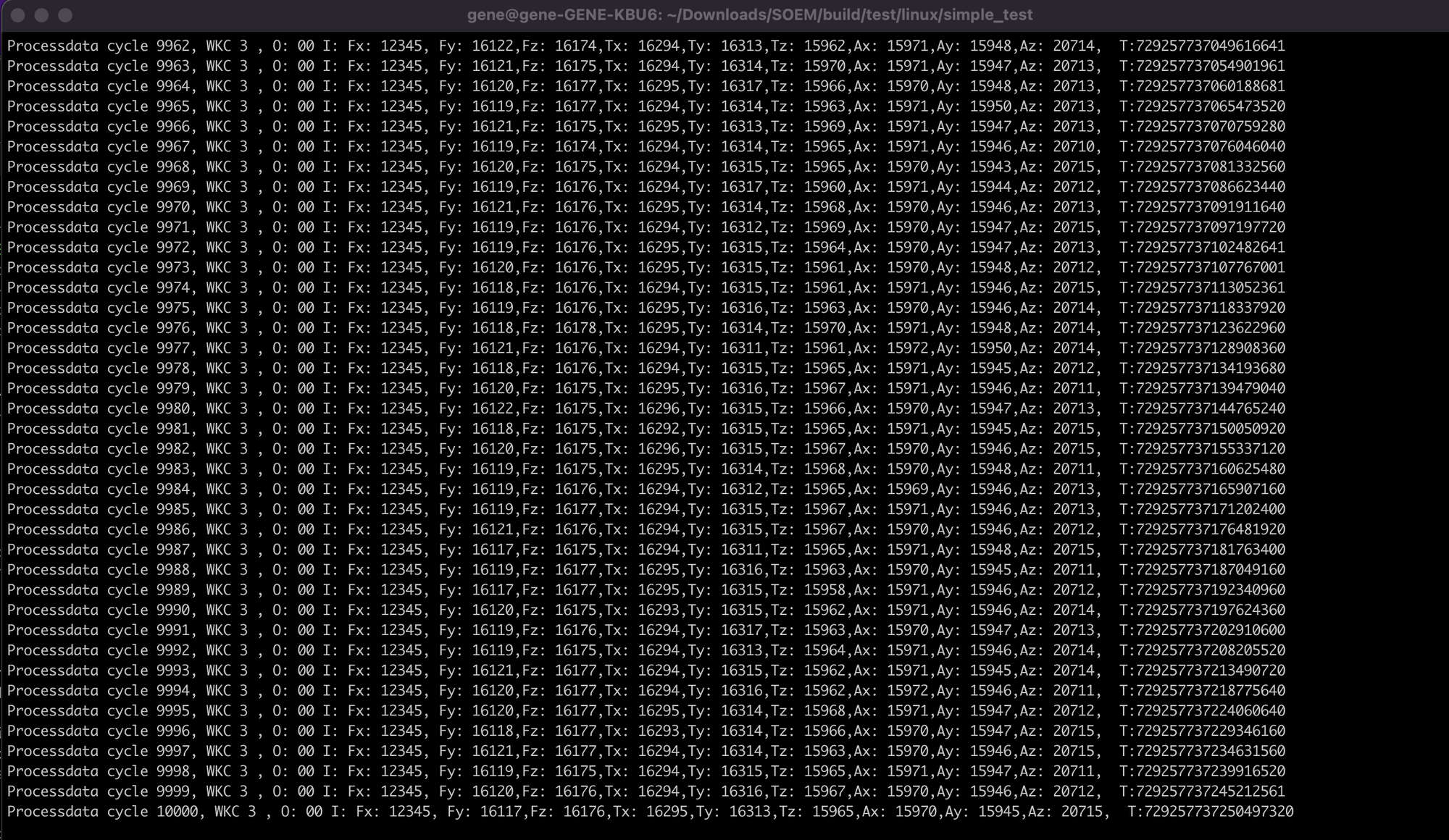
SOEM/build/test/linux/simple_test
sudo ./simple_test -(port)
Q & A
(내용 준비 중)
Revision History
| Date | Description |
|---|---|
| 2026.09.15 | Initial release (Current version) |